Pastel Circuit home

GuidesUpdated 2026-11-12

Pink and Teal LED Gaming Setup Ideas

The classic synthwave pairing is hot pink against cool teal. Here's how to place the lights so it looks deliberate instead of chaotic, plus the gear we'd shortlist at every budget.

Fine printThis page has affiliate links. If you buy through them we may earn a commission, at no extra cost to you. Picks are researched from specs and buyer reviews, not tested by us. As an Amazon Associate I earn from qualifying purchases. Full disclosure

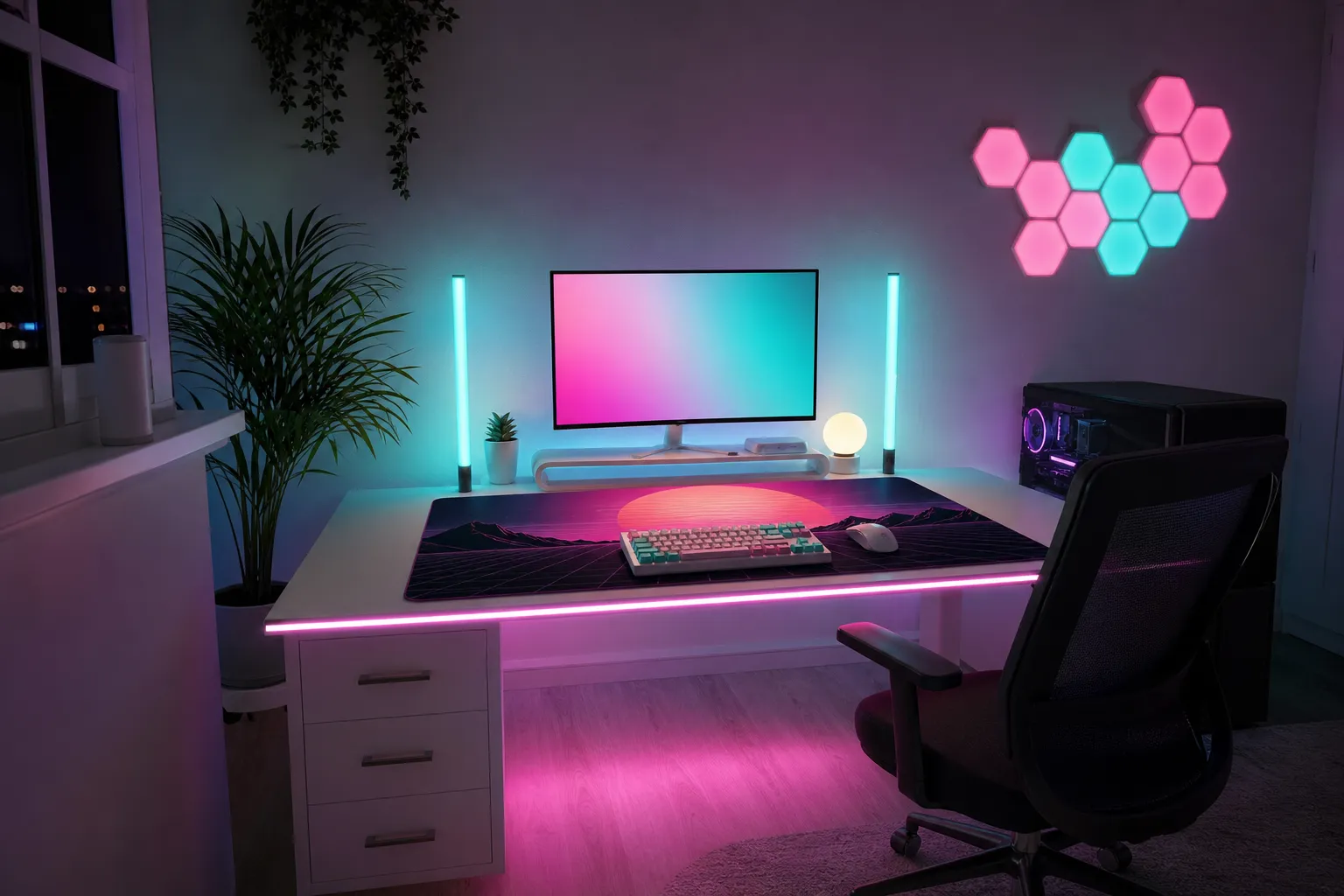
AI concept image of a white gaming desk lit with a teal light bar behind the monitor and pink LED under the desk, with hexagon panels on the wallAI concept image123
AI concept image: a generated room styled on the picks below. The items in it are look-alikes, not photos of the exact products.1Govee Smart RGBWIC Light Bars, 15 in (pair)2Govee Glide Hexagon Light Panels Ultra (10 pack, H606A)3Govee RGBIC LED Strip Lights 32.8 ft (Bluetooth, H617A)

The picks

Researched from specs and buyer reviews. We show price bands, not exact prices, because prices move; tap through for today's price and stock.

Budget pick
Illustration

Govee RGBIC LED Strip Lights 32.8 ft (Bluetooth, H617A)

GoveeUnder $25

Segmented RGBIC strip, so you can run a pink-to-cyan gradient along a desk or shelf. App control over Bluetooth only; no Wi-Fi or Alexa on this model.

Check price at Amazon Checked Nov 12, 2026
Top pick
Illustration

Govee Smart RGBWIC Light Bars, 15 in (pair)

Govee$50–$100

Pair of bars that stand beside a monitor or mount behind a 45-70 in TV; each bar shows multiple colors at once.

Check price at Amazon Checked Nov 12, 2026
Also great
Illustration

Govee Neon Rope Light 2 (16.4 ft, H61D5)

Govee$50–$100

Bendable neon rope you can shape into waves or a sunset outline on the wall; Matter compatible, with camera-based shape mapping in the Govee app. Indoor only.

Check price at Govee Checked Nov 12, 2026
Renter-friendly
Illustration

Govee Gaming Wall Light (H6063)

Govee$50–$100

Joinable light segments for drawing lines, zigzags or a simple sunset outline above a desk; a cheaper alternative to full panels.

Check price at Govee Checked Nov 12, 2026
Illustration

Nanoleaf Shapes Triangles Smarter Kit (7 panels)

Nanoleaf$100–$150

Triangle panels for sharp, retro geometric layouts; touch control, music sync and screen mirroring, with mounting tape included.

Check price at Nanoleaf Checked Nov 12, 2026
Splurge
Illustration

Govee Glide Hexagon Light Panels Ultra (10 pack, H606A)

Govee$150+

Govee's flagship panels with 129 LEDs that light both the edges and the faces; supports Razer Chroma and Govee DreamView sync.

Check price at Govee Checked Nov 12, 2026
Splurge
Illustration

Nanoleaf Lines 60 Degrees Starter Kit, 18 Lines (Pink)

Nanoleaf$150+

Backlit light bars with pink covers that join at 60 degrees, for neon-style triangles and lightning shapes; 18 lines is enough for a full feature wall.

Check price at Nanoleaf Checked Nov 12, 2026
Also great
Illustration

Orant Neon Palm Tree LED Neon Sign (made to order)

Orant Neon$150+

A real flex-neon palm tree made to order in hot pink, light blue or violet, from about 26 in wide; the centrepiece sign for an 80s Miami wall.

Worth knowing: Made to order; allow production time.

Check price at Orant Neon Checked Nov 12, 2026

Drawings are illustrations, not product photos. How we pick.

Why pink and teal works

Pink and teal sit almost opposite each other on the color wheel, so they make each other pop. The trick is not using them equally. Pick one as your main wash and the other as an accent:

  • Pink-dominant (about 70/30): warm and moody. Good for bedrooms and streaming backdrops.
  • Teal-dominant (about 70/30): cooler, more “night drive.” Easier on the eyes for long sessions.
  • Purple as the bridge: where the two colors overlap on a wall, set a fixture to purple so the change looks smooth rather than muddy.

Where to put each light

  1. Behind the monitor or TV (bias lighting), in teal. A strip on the back of the screen cuts eye strain in a dark room and gives the screen a halo. Keep it dim, around 10–20% of your screen’s brightness.
  2. Under the desk edge, in pink. A strip under the front lip throws light onto the floor and makes the desk look like it floats. Point the LEDs down and back so you can’t see the dots.
  3. High corners or along the ceiling line, in a slow pink→purple→teal fade. This is the cheapest way to color a whole room.
  4. One feature piece on the wall. Hex or line panels, or a neon-style sign, behind your chair or beside the screen. On camera this is your “set.”

Make strips look smooth, not dotty

  • Bounce, don’t point. Aim strips at a wall or surface instead of toward your eyes.
  • Use a diffuser channel (aluminum channel with a milky cover) for anything you can see directly. It turns dots into a clean neon line.
  • Leave 5–10 cm between the strip and the wall when you can. The further the light travels, the softer the gradient.

Renter-friendly mounting

  • Clean the surface with isopropyl alcohol before you stick anything.
  • On fresh or flat-finish paint, stick the strip to painter’s tape first. It comes off far more cleanly.
  • Use small adhesive clips at corners instead of trusting the strip’s own tape on the bend.

Power and cables

  • Count outlets before you buy. Three or four light products can fill a power bar quickly. A surge-protected bar with spaced outlets helps.
  • Run cables along the back legs of the desk and gather them with velcro ties or a cable tray under the desk.
  • Most strip controllers have a small IR or Bluetooth box. Stick it somewhere you can reach.

Safety basics

  • Don’t cover LED strips with fabric or bury them in insulation. Aluminum channels help with heat too.
  • Only cut strips at the marked cut lines, and don’t run more length than the power supply is rated for.
  • Buy from listings with clear electrical certification info (for example UL, ETL or CSA).